SCT——地图区块
.sct文件是一块可复用的地图地形——Cavedog 的关卡设计师在官方地图编辑器(TAE)中把几十个这样的区块拼接起来,制作出最终的.tnt地图。每个区块都打包了自己的图块图形、图块网格、每格的高度,以及一张缩略小地图。区块是构件;TNT 是拼装好的成品。
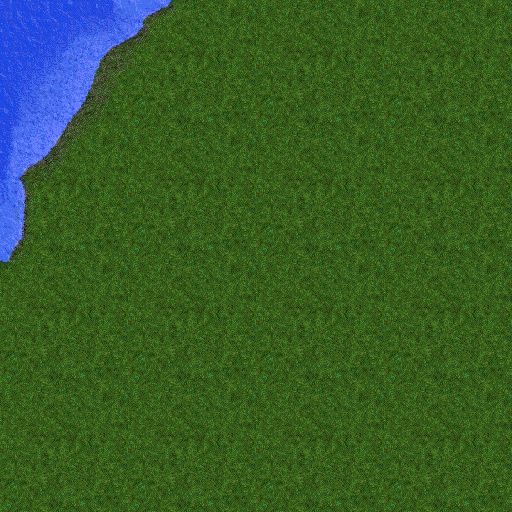
由 kbot sct image 渲染的 sections/greenworld/coast/b_n_w02_135.sct
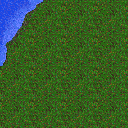

内嵌的小地图(左)和海拔网格(右)。
Tip
自己试试。
kbot sct info       sections/greenworld/coast/b_n_w02_135.sct
kbot sct describe   sections/greenworld/coast/b_n_w02_135.sct
kbot sct image      sections/greenworld/coast/b_n_w02_135.sct -t out.png
kbot sct minimap    sections/greenworld/coast/b_n_w02_135.sct -t mini.png
kbot sct heightmap  sections/greenworld/coast/b_n_w02_135.sct -t height.png
见 CLI 的 kbot sct 参考。
在 Go 中调用。 使用 formats/sct:
import "github.com/coreprime/kbot/formats/sct"

f, _ := os.Open("sections/greenworld/coast/b_n_w02_135.sct")
defer f.Close()
s, _ := sct.LoadFromReader(f)
fmt.Printf("%dx%d tiles, %d unique, %d heights\n",
    s.Header.Width, s.Header.Height, s.Header.NumTiles, len(s.HeightMap))
磁盘布局
┌─ Header (28 B) ──┐  version, pointers, dimensions
├─ Tile pixels ────┤  NumTiles × 1024 bytes (32×32 palette indices)
├─ Section data ───┤  Width × Height × int16 tile indices
├─ Height grid ────┤  (Width × 2) × (Height × 2) × {4 or 8} bytes
└─ Minimap ────────┘  128 × 128 palette indices
指针字段可以按任意顺序指向各个部分,但 Cavedog 的工具按上图的布局输出,所有第三方读取器也都这样假定。
文件头(28 字节)
typedef struct {
    uint32 Version;     // 2 or 3 (TA's TAE always emits 3)
    uint32 PtrMinimap;  // → 128×128 minimap
    uint32 NumTiles;    // unique 32×32 tile count
    uint32 PtrTiles;    // → tile pixel block
    uint32 Width;       // section width in tiles
    uint32 Height;      // section height in tiles
    uint32 PtrData;     // → tile-index grid + heights
} SCTHeader;| 字段 | 说明 |
|---|---|
Version |
零售版 TA 的区块为 3。一些早期原型使用 2——布局相同,但高度条目是 8 字节而不是 4 字节。kbot 两者都接受。 |
Width、Height |
都以图块(32 像素单位)表示。要与 TAE 兼容,两者都必须是 4 的倍数(即 128 像素的倍数)。 |
NumTiles |
不同图块的数量。数据部分中的索引网格指向这个数组。 |
图块像素
NumTiles 个块,每块 32 × 32 = 1024 字节——指向 TA 调色板的调色板索引。格式本身不会自动对相同的图块去重,所以构建得不好的区块可能会浪费空间;如果区块中有无法引用到的图块,kbot 的 image 命令会发出警告。
区块数据——图块索引 + 高度网格
int16 tileMap[Height][Width];     // Index into the tile pixel array
                                  // (signed; negative values are unused
                                  // in retail content but valid)

struct HeightCell_V3 { uint8 h; int16 always_minus_one; uint8 always_zero; };
struct HeightCell_V2 { uint8 h; int16 always_minus_one; uint8 always_zero;
                       uint32 reserved; };

HeightCell heights[Height * 2][Width * 2];高度网格比图块网格密四倍——每个图块有 2 × 2 = 4 个 16 像素分辨率的高度采样,与 TNT 属性格的工作方式一致。always_-1 和 always_0 字段是编辑器留下的临时元数据;往返时写回其中任一值都可以。
小地图
128 × 128 个调色板索引。无论区块的图块宽高如何,尺寸都是固定的,而且小地图会被拉伸以适应区块的宽高比,而不是加黑边。
读取顺序
header = read_struct(SCTHeader)
assert header.Version in (2, 3)

seek(header.PtrTiles)
tiles = [read(1024) for _ in range(header.NumTiles)]

seek(header.PtrData)
tile_map = read_int16_array(header.Width * header.Height)

entry_size = 4 if header.Version == 3 else 8
attrs_w, attrs_h = header.Width * 2, header.Height * 2
heights = [read(entry_size)[0] for _ in range(attrs_w * attrs_h)]

seek(header.PtrMinimap)
minimap = read(128 * 128)实例解析——b_n_w02_135.sct
$ kbot sct describe sections/greenworld/coast/b_n_w02_135.sct
Version:    3
Section:    4 × 4 tiles  (128 × 128 px)
Tiles:      64 unique
Heights:    8 × 8 cells (height range 50–62)
Minimap:    128 × 128
4×4 图块的区块是 TAE 能接受的最小区块(必须是 128 像素的倍数)。尽管这个区块只有 4 × 4 = 16 个放置位置,它却引用了 64 个不同的图块,因为每个 32×32 的格子本身都以边缘过渡为界,而设计师想要这些过渡的多种变化。这很正常——区块用存储空间换取了融合上的自由度。
TNT 如何使用区块
.tnt 地图的图块池是关卡设计师“画”进去的所有 .sct 的并集,事后由 TAE 去重。所以当你发现两个 TNT 共用某个图块时,它几乎总是来自同一个 SCT。
这种联系只存在于构建时。运行时的引擎从不打开区块;它只看到已经合并好的 TNT。区块以磁盘文件的形式存放在编辑器压缩包(worlds.hpi)和战役世界压缩包中,例如 sections/greenworld/coast/、sections/lava/hills/ 等。
坑点
Warning
Width × Height 必须是 4 的倍数,TAE 才能加载该区块。 格式本身并不强制这一点——你可以写出一个 3×3 图块的区块,kbot 也能顺利渲染它——但 Cavedog 的编辑器会以一条晦涩的“section misaligned”错误拒绝它。
Version == 2的高度格是 8 字节,而不是 4 字节。第一个字节仍然是海拔;其余 7 个字节是编辑器的临时数据,写入时可以置零。- 128×128 的小地图是拉伸的,而不是加黑边来适应区块的宽高比。一个 4×16 的区块在小地图中会被挤压得惨不忍睹。
- 除了
Version之外没有任何签名。要校验一个疑似 SCT 的文件,检查Version ∈ {2, 3},以及四个指针字段是否都落在文件范围之内。 - 高度范围完全由设计师决定。 TAE 会限制在 0–255 之间,但一个区块可以完全平坦(单一值),也可以覆盖全部范围。TNT 渲染器在显示前会做归一化;SCT 则不会。
典型大小
| 项目 | 在 Cavedog sections/**/*.sct 中观察到的范围 |
|---|---|
| 文件大小 | 30 KB – 2 MB |
| 区块尺寸(图块) | 4×4 – 32×32 |
| 每个区块的不同图块数 | 30–600 |
| 文件头开销 | 总是 28 字节 |
| 小地图(总是 128×128,带调色板) | 16384 字节 |
worlds.hpi 中的区块数 |
约 5000(涵盖所有地貌) |