FNT — 1-bit Bitmap Fonts
Total Annihilation ships a stable of
.fntfiles for everything from the on-screen radio chatter (comix.fnt) to the unit briefing screens (armbrief.fnt). They're tiny, variable-width, 1 bit per pixel bitmap fonts indexed by 8-bit character code — basically a sprite sheet with a lookup table.
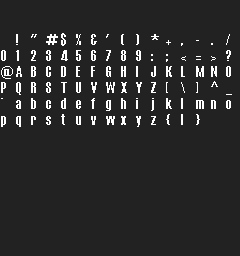
fonts/comix.fnt rendered as a 16-column sprite sheet by kbot fnt sheet

kbot fnt render comix.fnt --text "kbot" --fg "#ffff00" --bg "#000000"
Tip
Try it yourself.
kbot fnt info     fonts/comix.fnt                    # one-line summary
kbot fnt describe fonts/comix.fnt --list             # full metadata + glyph list
kbot fnt sheet    fonts/comix.fnt -o sheet.png       # all glyphs as a grid
kbot fnt render   fonts/comix.fnt --text "Commander" --fg "#ffff00" --bg transparent -o caption.png
kbot fnt dump     fonts/comix.fnt -t ./glyphs        # one PNG per character
See the CLI kbot fnt reference.
From Go. Use formats/fnt:
import "github.com/coreprime/kbot/formats/fnt"

f, _ := os.Open("fonts/comix.fnt")
defer f.Close()
font, _ := fnt.LoadFromReader(f)
fmt.Println(font.Height, "px,", font.GlyphCount(), "glyphs")
if g := font.Glyphs['A']; g != nil {
    fmt.Println("A is", g.Width, "px wide")
}
On-disk layout
┌─ 4-byte header ──────────┐
│ uint8   Height           │   byte 0: shared by every glyph; the line height
│ uint8   (ignored)        │   byte 1: not part of the height
│ int8    Baseline         │   byte 2: rows the glyphs extend above the pen
│ uint8   FirstChar        │   byte 3: code of the first offset-table entry
├─ (256 − FirstChar) × u16 ┤   file offsets; 0 = glyph not defined
├─ Glyph data ─────────────┤   for each defined glyph:
│   uint8  Width           │   pixel width (1..255), also the pen advance
│   ⌈Width × Height/8⌉     │   1bpp pixels, MSB-first bit stream
└──────────────────────────┘
Every retail font has FirstChar = 0, so its header + offset table is
4 + 256 × 2 = 516 bytes and glyph data starts immediately after.
| Field | Notes |
|---|---|
Height |
Byte 0 only. Pixel height shared by every glyph in the font (9–17 in the retail fonts). |
Baseline |
Byte 2, signed. Text drawn with the pen at row y puts the glyphs' top row at y − Baseline. Retail fonts store 1–3. |
FirstChar |
Byte 3. Character c uses offset-table entry c − FirstChar; codes below it have no glyph. Retail fonts store 0. |
Offsets[] |
Indexed by character byte (the retail game's text is Windows-1252). 0 means no glyph for this character. Non-zero values are offsets from the start of the font pointing at the glyph's Width byte. |
Glyph Width |
1–255. A width of 0 makes the game advance by 0 and draw garbage; kbot skips such glyphs and reports them. |
Older tools read bytes 2–3 as one opaque "flags" word; they are two separate fields.
Reading a glyph
The glyph payload is a continuous bit stream, MSB-first, packed left-
to-right then top-to-bottom — i.e. row-major scan. The number of bits is
Width × Height and the number of stored bytes is ⌈(Width × Height) / 8⌉.
def read_glyph(file, offset, height):
    file.seek(offset)
    width = file.read(1)[0]
    if width == 0 or width > 128:
        return None
    n_bits  = width * height
    n_bytes = (n_bits + 7) // 8
    bits    = file.read(n_bytes)
    pixels  = []
    for i in range(n_bits):
        bit = (bits[i // 8] >> (7 - (i % 8))) & 1
        pixels.append(bool(bit))
    return Glyph(width, height, pixels)
There is no kerning data and no advance width separate from Width.
The game lays text out like this, and kbot fnt render, the MCP
fnt_render tool and the asset explorer's text preview do the same:
- each byte of the text selects the glyph with that code (convert
UTF-8 text to the game's code page first;
kbot fnt render --codepagedefaults to Windows-1252); - a glyph advances the pen by exactly its width, with no gap;
- a character with no glyph draws nothing and advances by 0;
- drawing stops at the first NUL or newline.
A 13-row font with a 10-pixel A and no space glyph therefore draws
"A A" 20 pixels wide.
Note
There is no padding between rows. Each scan line continues from
wherever the previous one ended in the same byte. A glyph 5 pixels
wide and 7 pixels tall uses ⌈35/8⌉ = 5 bytes, with the 5 trailing
bits ignored.
Worked example — comix.fnt
$ kbot fnt describe fonts/comix.fnt
Height:        14 px
Baseline:      1 (glyph rows start this many rows above the pen)
First char:    0x00
Glyphs:        94 / 256 defined
Glyph width:   min=3 max=13 mean=5.9
Ranges:        0x20-0x7D
Reading this: it's a 14-pixel-high font covering printable ASCII (space
through }). Widths vary from 3 (i, l) to 13 (M, W). The 162
undefined slots are mostly non-printable control characters; the rest are
Latin-1 extras that the game doesn't display.
The offset table for the first ten characters of comix.fnt:
char  offset    width  bytes  meaning
0x20  0x021C    4      7     space
0x21  0x0223    3      5     '!'
0x22  0x0228    5      9     '"'
0x23  0x0231    6     11     '#'
0x24  0x023C    5      9     '$'
...
You can dump the same thing with kbot fnt describe --list.
Rendering tips
kbot fnt render supports:
| Flag | Effect |
|---|---|
--text "..." |
The string to render: one line; drawing stops at the first newline, as in the game. |
--codepage NAME |
Code page the UTF-8 text is converted to: cp1252 (default, the retail game's), cp1250, cp1251, cp437, cp850, iso-8859-1, iso-8859-15, or raw to pass the bytes through. Characters without a byte become ?. |
--fg #rrggbb[aa] |
Foreground colour. Default: white. |
--bg #rrggbb[aa] | transparent |
Background. Default: transparent. |
--target PATH |
Output PNG path. Stdout otherwise. |
A character not present in the font draws nothing and takes no space, as in the game.
Gotchas
Warning
Offsets[c] == 0 means "no glyph", not "glyph at offset 0". Offset
0 lands in the middle of the header and is structurally impossible —
Cavedog reuses the sentinel to mean undefined. Always treat zero
offsets as missing.
- Bit order is MSB-first within each byte. LSB-first is the more common convention in modern bitmap fonts; don't assume.
- Bit stream is continuous between rows — there's no padding to a byte boundary at the end of each scan line.
- Bytes 2 and 3 are the baseline and the first character code, not a flags word. A non-zero first character code shortens the offset table.
- Characters are bytes, not Unicode code points.
€is byte0x80in Windows-1252; taking a code point modulo 256 picks the wrong glyph. - No metadata about which characters are supported. You have to iterate the offset table to discover the glyph set.
Typical sizes
| Asset | Range observed in Cavedog fonts/*.fnt |
|---|---|
| File size | 700 B – 4 KB |
| Header + offset table | always 516 bytes |
| Glyph height | 9–17 px |
| Glyph width | 3–13 px |
| Defined glyphs per font | 60–120 (most are printable ASCII only) |
| Per-glyph data | typically 5–30 bytes (1 width byte + packed bits) |