PAL / ALP / LHT / SHD — Palettes and Colour Lookup Tables
Total Annihilation shipped its entire world in 256 colours. The
.palfile holds that palette; the.alp,.shdand.lhtfiles are lookup tables built from it that the engine uses to blend, shade and light pixels without leaving the indexed colour space.None of the four has a header, version field or compression. A
.palis 1,024 bytes (256 × RGBx);.alpis 65,536 bytes (256 rows of 256 palette indices) and.shd/.lhtare 8,192 bytes each (32 rows of 256 palette indices).
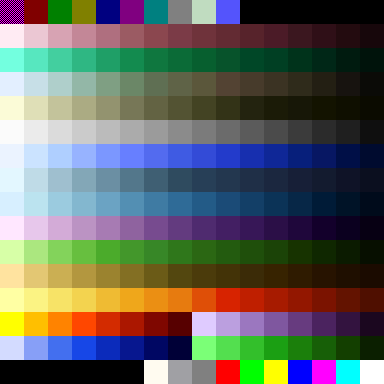
palettes/palette.pal — rendered by kbot pal swatch
Tip
Try it yourself.
kbot pal info     palettes/palette.pal              # one-liner
kbot pal describe palettes/palette.pal              # full RGB dump
kbot pal swatch   palettes/palette.pal -o pal.png --cell 24

# Render a lookup table, coloured by the palette:
# .alp as 256×256 cells, .shd / .lht as 256×32 cells
kbot pal lookup   palettes/palette.alp --palette palettes/palette.pal --target alp.png
kbot pal lookup   palettes/palette.shd --target shd.png
# TA: Kingdoms: the palette is usually a PCX next to its tables
kbot pal lookup   palettes/aramon.alp --palette palettes/aramon.pcx --target aramon.png

# Round-trip to editor-friendly formats
kbot pal convert  palettes/palette.pal -o palette.gpl                  # GIMP
kbot pal convert  palettes/palette.pal -o palette.txt --format jasc    # JASC
See the CLI kbot pal reference.
From Go. Use formats/pal:
import "github.com/coreprime/kbot/formats/pal"

p, _ := pal.LoadFromFile("palettes/palette.pal")
fmt.Printf("RGB[0] = %v (black; sprites key it per frame)\n", p.Colors[0])
for i, c := range p.Colors {
    fmt.Printf("%3d  #%02x%02x%02x\n", i, c.R, c.G, c.B)
}
On-disk layout (.pal)
typedef struct {
    uint8 R;
    uint8 G;
    uint8 B;
    uint8 A;     // Unused. Cavedog files have this as 0 throughout.
} PALEntry;

PALEntry entries[256];   // 256 × 4 = 1024 bytes
There is no signature and no version. The game loads
palettes/<name>.pal like this (kbot-io's pal.LoadNamed does the same,
and the studio and asset explorer load palette.pal through it for every
TA render: tile pool, minimaps, sandbox terrain, features, textures and
model colours):
- 1,024 bytes or more: the first 1,024 bytes are the palette; the rest is ignored.
- Empty or missing: the palette comes from
palettes/<name>.pcxinstead — the last 768 bytes of that file, whether or not a0x0Cmarker precedes them. TA 3.1c then rebuilds the.alp,.shdand.lhttables for those colours. - 1 to 1,023 bytes: not usable; the game reads 1,024 bytes past the end of the file. kbot reports an error (and the studio falls back to the built-in TA palette).
.pal — the canonical TA palette
The bytes R, G, B, A per entry literally mean red, green,
blue, unused. Index 0 is ordinary black. Terrain tiles,
minimaps and backdrops draw it opaque (62 of the 275 retail maps use it
in their tiles). Transparency is decided per image, not by the palette:
a GAF frame's key byte (often 9, sometimes 0) and its skipped pixels are
transparent, and model textures are sampled without a key.
| Index | TA convention | Notes |
|---|---|---|
0 |
Black | Opaque in terrain, minimaps and backdrops; transparent only in sprite frames whose key is 0. |
9 |
"Magic pink" | Used by editor tooling as a fill colour for transparent regions in PCX/GAF before encoding; not transparent at runtime. |
16–95 |
Player-colour cycles | The engine swaps these out per side to recolour units. |
223–254 |
Reserved | Mostly used by team-colour cycles and special effects. |
255 |
Pure white | Frequently used for laser cores. |
Note
The 256 RGB triplets are not arbitrary. Cavedog hand-tuned the
palette so that smooth ramps exist for each of the major
material families (metal, organic, water, sky, lava, …). Replacing
entries to mod a "new" colour in usually breaks every unit that drew
from that ramp. See pal describe's output for the ramp groupings.
.alp / .shd / .lht — colour lookup tables
These three files are not RGB data: every byte is a palette index. Each table has one 256-entry row per blend partner or level, and its columns are the 256 source colours:
| File | Size | Rows | Entry [r][c] |
|---|---|---|---|
.alp (alpha) |
65,536 | 256 | The index nearest the average of colours r and c: a half-and-half blend, used for translucent drawing. Symmetric, and [c][c] is c. |
.shd (shade) |
8,192 | 32 | The index nearest colour c scaled by r × 0.06875: row 0 is black, rows 14–15 leave colours nearly unchanged, higher rows brighten them. |
.lht (light) |
8,192 | 32 | The index nearest colour c scaled by 1 + r/30, from unchanged (row 0) to about twice as bright. |
uint8 alp[256][256];   // blend = alp[a][b]
uint8 shd[32][256];    // shaded = shd[level][c]
uint8 lht[32][256];    // lit    = lht[level][c]
Practically: the engine never blends colours arithmetically — it does a table lookup, so the resulting pixel is always a real palette index that can be drawn through the existing 8bpp pipeline. This is why all the shadows in TA look like a darker version of the same colour ramp, not "50% black overlaid": each shaded result is the palette index closest to that mathematical mix.
The game uses a table file only when its size is exact; a missing table
or one of any other size is rebuilt from the palette. kbot pal lookup
therefore rejects files of any other size. TA: Kingdoms ships tables of
the same sizes for nearly every palette in its palettes/ folder; most
of those palettes are PCX files, and kbot pal lookup --palette takes a
.pcx as well as a .pal.
Important
A lookup table is not a palette. Rendering a .alp with kbot pal describe will show you garbage RGB values because the bytes are not
RGB. Use kbot pal lookup to see what they actually do — pass the
companion .pal so each lookup cell can be coloured with the palette
entry it resolves to.
Worked example — palette.pal
The first 16 entries of the stock TA palette:
| Idx | Hex | R G B | Role |
|---|---|---|---|
| 0 | #000000 |
0 0 0 | Black (opaque in terrain; the key of some sprite frames) |
| 1 | #800000 |
128 0 0 | Dark red |
| 2 | #008000 |
0 128 0 | Dark green |
| 3 | #808000 |
128 128 0 | Olive |
| 4 | #000080 |
0 0 128 | Dark blue (water shadow) |
| 5 | #800080 |
128 0 128 | Dark magenta |
| 6 | #008080 |
0 128 128 | Dark cyan |
| 7 | #808080 |
128 128 128 | Mid grey |
| 8 | #C0DCC0 |
192 220 192 | Pale green |
| 9 | #5454FC |
84 84 252 | "Magic pink" (editor transparency) |
| 10–15 | #000000 × 6 |
0 0 0 | Reserved padding |
kbot pal describe palettes/palette.pal prints the full table.
Worked example — palette.alp and palette.shd as lookups
Rendering the tables with the palette as colour source
(kbot pal lookup … --cell 2):
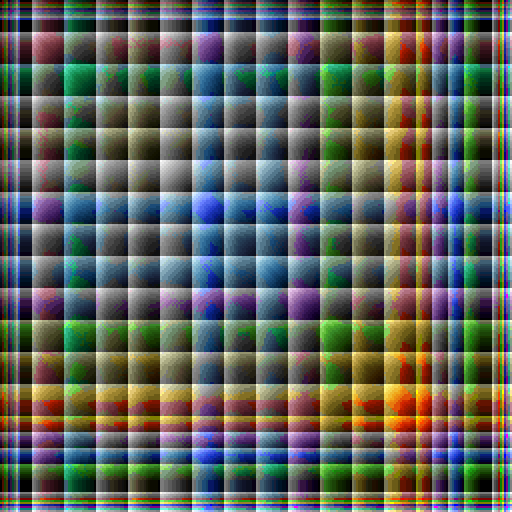
palette.alp: 256 × 256 cells. Row a, column b shows the blend of colours a and b;
the diagonal reproduces each colour.

palette.shd: 256 × 32 cells. Each column is a source colour;
rows run from black (row 0) through the colour itself to brighter shades.
Reading the shade table: column 80 (mid-grey) starts black in row 0,
climbs through darker greys of its ramp, reaches itself around rows 14
and 15, and then brightens. The engine never needs to multiply RGB
values — it just reads shd[level][c].
Converting palettes for editors
kbot pal convert understands several editor-friendly output formats:
| Format | Extension | Tool |
|---|---|---|
Binary TA .PAL |
.pal |
The format itself; useful for re-emitting after edits. |
| GIMP Palette | .gpl |
GIMP, Krita, Inkscape. |
| JASC-PAL (text) | .pal / .txt (--format jasc) |
Paint Shop Pro, Aseprite. |
| PNG swatch | .png (via kbot pal swatch) |
Visual reference; not loadable as a palette. |
The reverse direction — importing a .gpl or .pal (JASC) back into a
binary TA .pal — works as long as the source has 256 entries.
Note
The TA palette has 13 duplicate RGB triplets. If your editor
deduplicates colours on import (some do), you'll lose entries and the
palette will silently become a 243-entry palette. kbot pal info
reports the duplicate count so you can spot the difference; round-trip
through kbot pal convert -o roundtrip.pal to verify.
Gotchas
Warning
The 4th byte per entry is not alpha. It's an unused padding byte
Cavedog always set to 0x00. Several open-source palette tools read
it as alpha, then refuse to render the palette (alpha=0 everywhere ⇒
all transparent). kbot ignores it on read and emits 0x00 on write.
- Index 0 is not transparent by itself. Terrain, minimaps and backdrops draw it as black; a sprite frame is transparent only where its own key (or skip run) says so. kbot's terrain and minimap renders use an opaque palette.
- No magic numbers means weak validation. The only way to sanity-check
a
.palis to require at least 1024 bytes and (optionally) that the alpha byte is zero in every entry. - A lookup table of the wrong size is ignored by the game and rebuilt from the palette.
.alp/.lht/.shdare not interchangeable. They're tuned for different effects; swapping them will produce visibly wrong shadows or lighting.- TA: Kingdoms uses per-side PCX-embedded palettes, not the global
.palworkflow. See PCX for the carrier-PCX trick.
Typical sizes
| File | Size | Notes |
|---|---|---|
palette.pal |
1,024 bytes | The game reads the first 1,024 bytes of a longer file. |
palette.alp |
65,536 bytes | 256 × 256 palette indices. |
palette.shd / palette.lht |
8,192 bytes | 32 × 256 palette indices. |
GIMP .gpl export |
~5 KB | Text format, much larger than binary. |
JASC .pal (text) export |
~3 KB | Same. |
kbot pal swatch PNG |
1–10 KB | Depends on --cell size. |
| Total palette files in stock TA | ~15 files | One canonical palette.* set plus a few alt UI palettes. |