TAF / TSF — TA: Kingdoms Truecolor Animations
TAF stores truecolor sprite animations for Total Annihilation: Kingdoms: spell effects, explosions, fireballs, magic rings, water sprites and the animated menu backgrounds. It reuses the Total Annihilation GAF container layout but swaps the 8-bit palette-indexed pixels for 16-bit ARGB, so a TAF carries its own colour and a real alpha channel — no external palette required. TSF is the human-readable text form of the same animation: a brace-delimited script the GUI loader reads directly.


Tip
Try it yourself.
kbot taf list   anims/manabomb_1555.taf                                 # sequence + frame count
kbot taf export anims/fireballa_1555.taf --format gif -o fireball.gif    # animated preview
kbot taf sheet  anims/manabomb_1555.taf --cols 5 -o manabomb-sheet.png   # contact sheet
kbot taf decompile anims/manabomb_1555.taf --target ./manabomb           # → TSF + PNG layers
See the CLI kbot taf / kbot tsf reference
for every flag.
From Go. Use formats/tsf:
import "github.com/coreprime/kbot/formats/tsf"

data, _ := os.ReadFile("anims/manabomb_1555.taf")
taf, _ := tsf.ParseTAF(data)
fmt.Println(taf.Name, len(taf.Frames))
img, _ := taf.FrameImage(0)   // *image.NRGBA, full alpha preserved
At a glance
┌─ Header (12B) ─┐
│ ver  1  pad    │   ver = 0x00010100, exactly one sequence
└────────┬───────┘
         ▼
┌─ Entry pointer ─┐  1 × uint32 absolute offset → SequenceHeader
└───┬─────────────┘
    ▼
┌─ SequenceHeader (40B) ─┐
│ frameCount, name[32]   │
└─────────┬──────────────┘
          ▼
┌─ FrameListItem (8B) × frameCount ─┐  ptr + tick duration
└───┬───────────────────────────────┘
    ▼
┌─ FrameInfo (24B) ─┐
│ size, origin,     │
│ format(4/5),      │   ← the GAF "compressed" byte, repurposed
│ layers=0, flag,   │
│ ptrPixelData      │
└─────┬─────────────┘
      ▼
┌─ Pixel data: Width×Height × uint16 ─┐  raw ARGB4444 or ARGB1555
└──────────────────────────────────────┘
A TAF is a single animation sequence — an array of frames, each a width × height rectangle of little-endian 16-bit truecolor pixels with an origin point and a tick duration. There is no compression and no layering at the binary level: every frame is a flat, uncompressed bitmap.
Note
TAF is the GAF container with a different pixel payload. If you have
read GAF, the header, entry table, sequence header and frame
list are byte-for-byte familiar. Only the FrameInfo interpretation and
the pixel encoding change. The two coexist under the .taf extension:
TA: Kingdoms ships paletted .taf files (read them as a
GAF) and truecolor .taf files (this page). kbot tells
them apart by the format byte in each frame — see Telling the two
apart.
Header (12 bytes)
typedef struct {
    uint32 Version;        // 0x00010100 — identical to the GAF version word
    uint32 SequenceCount;  // Always 1 for a truecolor TAF
    uint32 Unknown1;       // Always 0
} TAFHeader;| Field | Notes |
|---|---|
Version |
0x00010100, the same word a TA GAF carries. Validate it before trusting any offset. |
SequenceCount |
Always 1. Followed immediately by one uint32 absolute offset pointing at the SequenceHeader. A multi-sequence file is not a truecolor TAF. |
Unknown1 |
Always zero; emit zero on write. |
Sequence (40 bytes)
typedef struct {
    uint16 FrameCount;
    uint16 Unknown1;       // Always 1
    uint32 Unknown2;       // Always 0
    char   Name[32];       // NUL-padded, case-preserved
} TAFSequence;
Followed by FrameCount × FrameListItem:
typedef struct {
    uint32 PtrFrameInfo;   // → FrameInfo
    uint32 Duration;       // Game ticks (30 ticks = 1 second)
} FrameListItem;
Warning
The 32-byte name field can carry junk past the terminator. Several retail TAFs leave uninitialised buffer bytes after the NUL — kbot preserves the exact 32 bytes so a parse → serialise round-trip is byte-identical, but only the text up to the first NUL is the real name.
Frame (24-byte info + payload)
typedef struct {
    uint16 Width;
    uint16 Height;
    int16  OriginX;        // Render anchor, may be negative
    int16  OriginY;
    uint8  Transparency;   // 0x08: always 0 (alpha lives in the pixels)
    uint8  Format;         // 0x09: 4 = ARGB4444, 5 = ARGB1555
    uint8  LayerCount;     // 0x0A: always 0 (no sub-frames)
    uint8  Flag;           // 0x0B: 0x00 or 0xFF, meaning unconfirmed
    uint32 Unknown2;       // 0x0C: always 0
    uint32 PtrPixelData;   // 0x10: → raw pixel bytes
    uint32 Unknown3;       // 0x14: always 0
} FrameInfo;
This is where TAF diverges from GAF. In a GAF FrameInfo, offset 0x09
is the Compressed flag and offsets 0x0A–0x0B are a 16-bit
LayerCount. A truecolor TAF reuses those same bytes to mean:
| Offset | GAF meaning | TAF meaning |
|---|---|---|
0x08 |
TransparencyIndex |
Transparency — unused, always 0 |
0x09 |
Compressed (0/1) |
Format — 4 (ARGB4444) or 5 (ARGB1555) |
0x0A |
LayerCount low byte |
LayerCount — always 0 |
0x0B |
LayerCount high byte |
Flag — 0x00 or 0xFF, purpose unknown |
OriginX / OriginY are the anchor used when blitting the frame —
typically the centre of the effect, so a 50×48 explosion has origin
25,24. kbot keeps the Flag byte verbatim for byte-exact round-trips
even though its meaning is unconfirmed across the retail asset set.
Pixel data
PtrPixelData points at exactly Width × Height little-endian uint16
values — 2 bytes per pixel, top-down, left-to-right, no compression and no
row headers. The 16 bits decode by the frame's Format:
ARGB4444 (Format == 4)
 bit 15 ──────────────────────────── bit 0
┌─────┬─────┬─────┬─────┐
│  A  │  R  │  G  │  B  │   4 bits each
└─────┴─────┴─────┴─────┘
  15-12  11-8   7-4   3-0
Each 4-bit channel widens to 8 bits by bit replication (v<<4 | v),
so 0xF → 0xFF and 0x0 → 0x00. The expansion is exactly
invertible, which is what lets kbot round-trip pixels losslessly.
ARGB1555 (Format == 5)
 bit 15 ──────────────────────────── bit 0
┌─┬───────┬───────┬───────┐
│A│   R   │   G   │   B   │   1 + 5 + 5 + 5
└─┴───────┴───────┴───────┘
 15  14-10   9-5    4-0
The single alpha bit is all-or-nothing (0 → fully transparent, 1 →
fully opaque); each 5-bit colour channel widens by replication
(v<<3 | v>>2). Use ARGB1555 for hard-edged sprites that only need a
1-bit cutout and ARGB4444 when you need 16 levels of soft alpha (smoke,
glows, fades).
Important
TAF needs no palette. Unlike GAF — which only stores indices and
depends on palettes/palette.pal or a TA:K sidecar PCX — every TAF
pixel already contains its own colour and alpha. Rendering is a direct
16-bit → 32-bit expansion with no lookup table involved.
Telling paletted and truecolor TAF apart
Both kinds of .taf share the GAF header and version word, so you cannot
distinguish them from the first 12 bytes. The discriminator is the frame
Format/Compressed byte at FrameInfo offset 0x09:
| Byte at 0x09 | File is | Read with |
|---|---|---|
0 or 1 |
Paletted GAF-style animation (a value of 0/1 means uncompressed/compressed) | GAF loader + a palette |
4 or 5 |
Truecolor animation (ARGB4444 / ARGB1555) | this page (formats/tsf) |
kbot taf validates the byte and refuses a paletted file with a clear
error; reach for kbot gaf in that case. Most TA:K truecolor TAFs also
follow a filename convention — a _4444 or _1555 suffix
(manabomb_1555.taf, bluefire_4444.taf) — but the format byte is the
authority, not the name.
TSF — the text form
TSF (TAF Source Format) is the same animation expressed as a
brace-delimited, INI-like script. The TA: Kingdoms GUI loader reads TSF
directly for menu backgrounds, and it is the interchange format kbot
emits when you decompile a TAF: one section per animation, a nested
Frame per frame, and one Layer per frame referencing an external image
file.
/* anims/titlescreen.tsf — abridged */
[JPGTest]
{
    Looping = 0;
    [Frame0]
    {
        Delay = 0;
        [Layer0]
        {
            AnchorX = 0;
            AnchorY = 0;
            Filename = TitleScreen.jpg;
        }
    }
    [Frame1] { /* … */ }
}| Token | Maps to | Notes |
|---|---|---|
[Name] { … } |
The animation sequence | One per document; Name becomes the TAF sequence name. |
Looping |
(advisory) | Authoring hint; the binary TAF has no looping field. |
[FrameN] |
A Frame |
Delay is the duration in game ticks. |
Format |
Frame.Format |
ARGB4444 (default if omitted) or ARGB1555. |
[LayerN] |
The frame's image | Filename references an external PNG/JPG; AnchorX/Y become the frame origin. |
A compiled TAF flattens each frame's single layer into one truecolor
bitmap. kbot expects exactly one layer per frame (multi-layer compositing
is a GUI-authoring nicety the compiler resolves at build time) — kbot tsf lint flags anything that won't compile cleanly.
Tip
Inspect a TSF without touching the images.
kbot tsf info anims/titlescreen.tsf   # animation, frames, layer filenames
kbot tsf lint anims/titlescreen.tsf   # shape check; non-zero exit on errors
lint validates structure only — use kbot taf compile to exercise the
full image-loading pipeline.
Worked example — manabomb_1555.taf
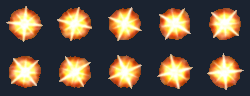
$ kbot taf info anims/manabomb_1555.taf
TAF: anims/manabomb_1555.taf
Sequence:  "manabomb"
Frames:    10
Duration:  20 ticks (0.67s)

#  Size   Origin  Format    Duration  Flag
─  ────   ──────  ──────    ────────  ────
0  50x48  25,24   ARGB1555  2         0x00
1  50x48  25,24   ARGB1555  2         0x00
...
9  50x48  25,24   ARGB1555  2         0x00
Ten 50×48 frames, each anchored at its centre (25,24) and held for 2
ticks — a ⅔-second explosion star. The whole file is 48,376 bytes:
50 × 48 × 2 = 4,800 pixel bytes per frame × 10, plus the header, sequence
header, frame list and ten 24-byte info records.
CLI workflows
The kbot taf tree covers inspection, rendering, conversion and the
TAF↔TSF compile cycle; kbot tsf covers the text form. Every command
resolves its input through the active kbot context
or an explicit --vfs mount, exactly like kbot gaf and kbot studio,
so bare filenames like manabomb_1555.taf resolve against every mounted
archive.
Inspect & render
kbot taf info   anims/bluefire_4444.taf            # per-frame table
kbot taf list   anims/bluefire_4444.taf            # one-line summary
kbot taf render anims/bluefire_4444.taf --frame 4 -o frame4.png
kbot taf sheet  anims/bluefire_4444.taf --cols 6 --bg "#202830" -o sheet.png
kbot taf export anims/bluefire_4444.taf --format apng -o bluefire.png   # or --format gif
export defaults to APNG, which keeps the full alpha channel; --format gif quantises to a 255-colour table plus one transparent slot (a 1-bit
cutout) for previews and chat clients.
Decompile ↔ compile round-trip
kbot taf decompile anims/manabomb_1555.taf --target ./manabomb
#   → manabomb/manabomb.tsf  +  manabomb_0.png … manabomb_9.png

kbot taf compile ./manabomb/manabomb.tsf --images ./manabomb -o rebuilt.taf
kbot taf diff anims/manabomb_1555.taf rebuilt.taf      # exits 0 — identical
decompile writes a TSF plus one PNG per frame; compile reads them back
into a binary TAF. For any TAF kbot parsed, the round-trip is
byte-identical — kbot taf roundtrip and kbot taf diff both verify it.
Import from common formats
kbot taf from-gif   boom.gif   --format argb4444 --name Boom        -o boom.taf
kbot taf from-sheet strip.png  --frame-width 64 --frame-height 64 \
                               --count 8 --delay 3 --format argb1555 -o strip.taf
from-gif flattens an animated GIF (honouring its disposal modes and
per-frame delays) into a truecolor TAF; from-sheet slices a fixed-grid
PNG/JPG sprite strip into frames. Both let you choose the target pixel
format.
Validate
kbot taf lint anims/manabomb_1555.taf # structural findings; non-zero exit on errorsMCP tools
The same surface is exposed over the MCP server so an agent can inspect and show animations directly:
| Tool | Purpose |
|---|---|
taf_info |
Full per-frame JSON: name, sizes, origins, formats, durations. |
taf_list |
One-line JSON summary. |
taf_render |
Render one frame and return it inline as a PNG (optionally also save it). |
taf_sheet |
Render every frame into a contact sheet, returned inline as a PNG. |
taf_export |
Write an animated GIF or APNG to disk. |
taf_lint |
Structural diagnostics as JSON. |
tsf_info |
Summarise a TSF document (animation, frames, layer filenames). |
tsf_lint |
Shape-check a TSF document. |
taf_render and taf_sheet hand back an image content block, so a model
can preview a spell effect without a separate file-read round-trip. Paths
resolve against the configured game-data folder the same way every other
kbot MCP tool does.
Gotchas
Warning
.taf is overloaded. A .taf may be a paletted GAF or a
truecolor animation. Always check the frame format byte (0x09), not
the extension or filename — see Telling the two apart.
- Exactly one sequence. A truecolor TAF always holds a single
animation; a
SequenceCountother than1means you are looking at a different (probably paletted) file. - No compression, ever. Every frame is a flat
Width×Height16-bit bitmap. There is no RLE path like GAF's — large flame effects (composite02flame) reach ~600 KB precisely because nothing is packed. - The name field can hold junk. Bytes after the terminating NUL are uninitialised in several retail files; preserve all 32 bytes for an exact round-trip, but read only up to the NUL.
- The
0x0Bflag byte is unexplained. Observed as0x00or0xFF. kbot keeps it verbatim; don't normalise it or round-trips stop matching. - GIF export is lossy. GIF can only hold a 1-bit cutout and 255 colours — soft ARGB4444 alpha becomes hard edges. Use APNG to preserve the real alpha channel.
Delay/Durationof 0 is legal. Like GAF, a zero-tick frame is event-driven (the menuJPGTestexample usesDelay = 0for a static background). Don't "fix" it to a default.
Typical sizes
| Asset | Range observed in TA:K TAFs |
|---|---|
Small effect (bluefire_4444, 12 × 32-ish frames) |
~30–60 KB |
Explosion (manabomb_1555, 10 × 50×48) |
~48 KB |
Fireball / spell (fireballa_1555) |
~50–120 KB |
Large composite flame (composite02flame) |
~600 KB (uncompressed truecolor adds up) |
| Per-frame pixel data | Width × Height × 2 bytes, exactly |
See also
- GAF — the paletted container TAF is built on; read it first,
and use it for paletted
.taffiles. - PCX — how paletted TA:K assets supply their colours (truecolor TAF needs none).
- TA:K GUI — the menu system whose loader consumes TSF directly for animated backgrounds.
- TA vs TA:K formats — what the two games share and where they diverge.
- Glossary — origin, tick, sub-frame.